Cue lists and GO
Running cues: GO, STOP, KILL, follows, jumps and multiple cue lists.
A cue list is an ordered sequence of cues with a pointer into it.
GO moves the pointer and fires what it lands on. You can have as many cue
lists as you like, and they all run at once.
In the GUI
The Cues tab, and its duplicate in the bottom-right cue pane, both carry:
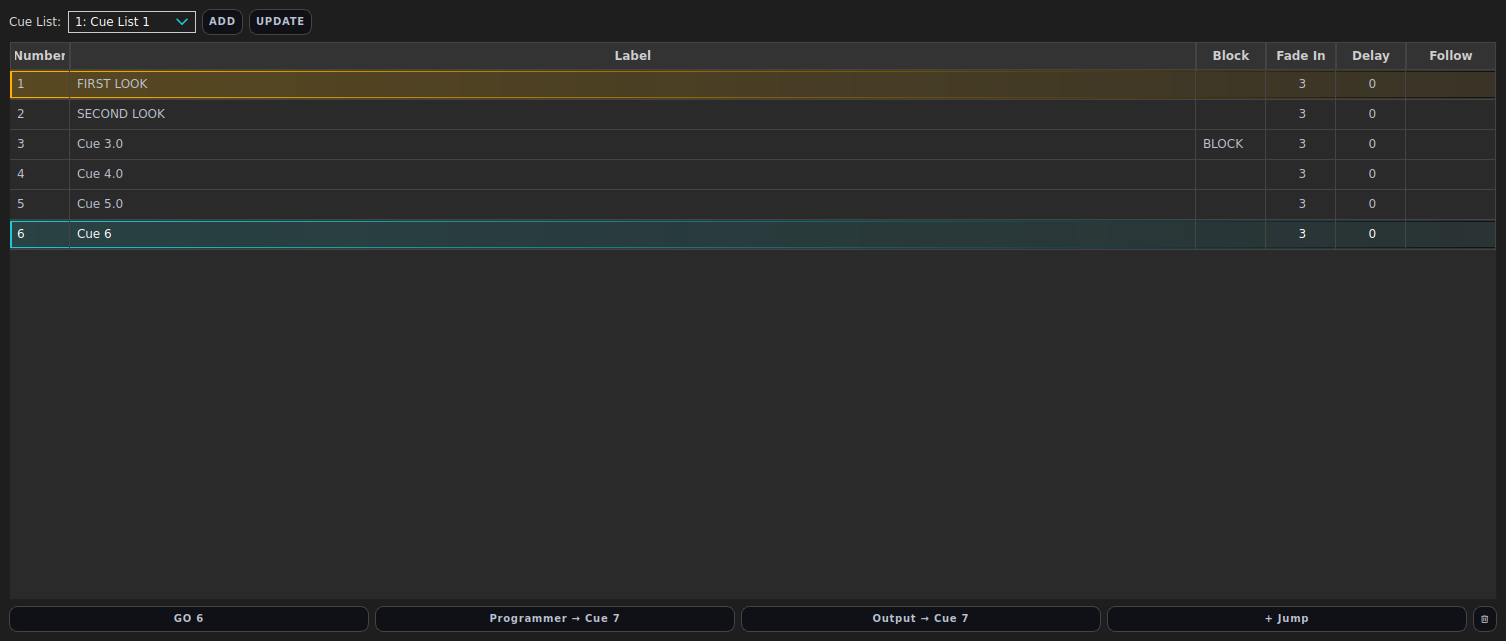
| Control | Does | Command |
|---|---|---|
| Cue list combo | Chooses which cue list the table and GO refer to | SELECT CUELIST <id> |
| ADD | Creates a new cue list | ADD CUELIST [<name>] |
| UPDATE | Renames the selected cue list | UPDATE CUELIST <id> <name> |
| GO | Fires the next cue; the button shows which | GO |
| Cue table | Click to select; the row highlights show what has played and what is next | - |
Row colours in the cue table: green is the cue that last played, amber is the cue GO will fire next, blue is a cue active on an executor.
Running a list
GO                      # next cue in the selected list
GO NEXT                 # the same
GO PREV                 # the previous cue
GO 12                   # jump straight to cue 12
GO 2 5                  # cue 5 of cue list 2
GO 2 NEXT               # next cue of cue list 2
Stopping:
STOP                    # fade out the selected cue list
STOP FADE 3             # …over 3 seconds
STOP CUELIST 2 + 3      # named lists
STOP ALL                # every cue list (a FADE after ALL is ignored)
KILL                    # cut the selected list out with no fade
KILL CUELIST 2
STOP fades; KILL cuts. Reach for STOP unless you actually want the snap.
Both are also buttons in the row under the cue table - in the Cues tab and in the cue pane next to the command line. STOP is next to GO; KILL is at the far end of the row, out of the way of it. They act on the cue list the selector above the table is showing.
The blunt instrument is:
PANIC                   # kill all cue lists, release all faders,
                        # stop all effects, clear the programmer
Several cue lists at once
Every cue list has its own pointer and its own layer, and they merge like any other playback source (Output and master controls). Typical uses: a main list for the show, a second list for house lights, a third for a looping background state.
ADD CUELIST "House"
SELECT CUELIST 2
STORE CUE 1 "House full"
LIST CUELISTS
SHOW CUELIST 2
SELECT CUELIST only changes which list the bare commands refer to - every
other list keeps running.
Follows: firing the next cue automatically
CUE 5 FOLLOW ON            # fires the moment cue 5 fires
CUE 5 FOLLOW AFTERDELAY    # fires once every part of cue 5 has finished
                           #   fading in (max part delay + fade up)
CUE 5 FOLLOW OFF
In the GUI, double-click a cue’s Follow cell to cycle Off → Follow → After Delay.
A manual GO while a follow is pending cancels the pending auto-fire, so taking manual control never double-fires.
Jump cues
A jump cue produces no light: it redirects playback to another cue, which is how you build a loop or skip a section. Add one with the + Jump button on the Cues tab.
Combine a jump with follows and you have a self-running loop; take the follow off and GO steps through it manually.
The exit cue
One cue can be nominated to fire as LMX shuts down - house lights up, or a worklight state, so the room is never left dark by quitting:
CONFIG EXITCUE 90
CONFIG EXITCUE OFF
On quit LMX clears every layer, executor and effect, then fires the exit cue instantly.
What GO does to the programmer
Nothing. The programmer sits above playback, so a value you are holding will
override the cue you just fired. If a GO appears to do nothing, CLEAR PROGRAMMER and try again.
What GO does to the last cue is decided by tracking: values the new cue does not restate stay on.
Cue lists on faders and MIDI
A whole cue can be loaded onto a fader, and GO can be mapped to a key or a MIDI note:
LOAD CUE 12 AT FADER 3 MODE HTP NAME "Act 2"
MAP KEY NUM0 GO
MAP MIDI "APC mini" 1 NOTE 98 TO GO
See Faders and pages and MIDI and keyboard mapping.