Patch Wizard
Patching a rig in bulk, with addresses and positions worked out for you.
The fast way to patch: pick a fixture from the library, say how many and where, and click the DMX grid to place them.
Open it with the Patch wizard button under the Fixtures table, from
File → Patch Wizard, or with PATCH WIZARD.

The three panes
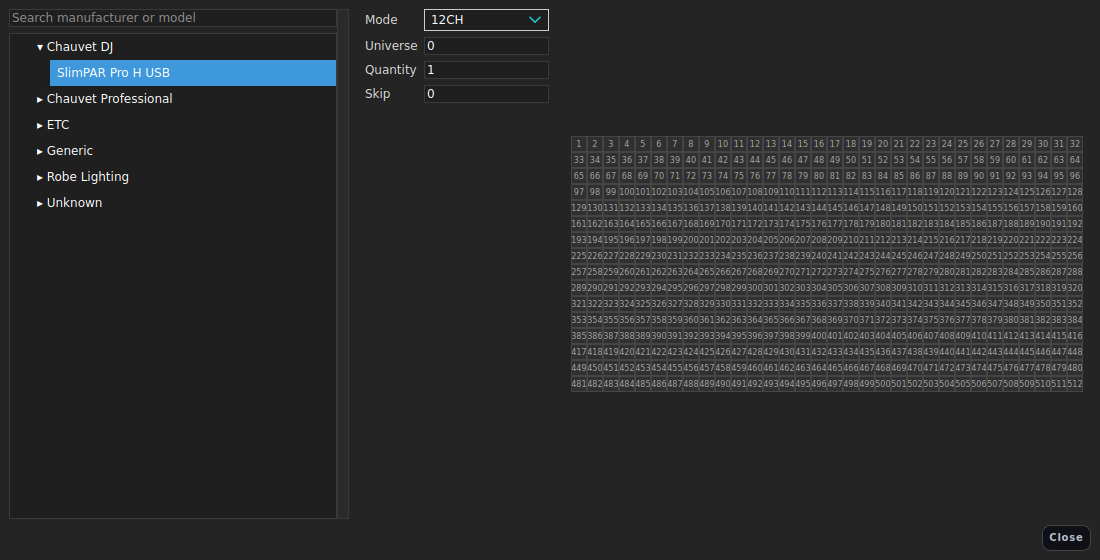
Left - the fixture library. Search or browse by manufacturer and model. Everything in the library is here, including anything you have imported or built in the Fixture Editor.
Middle - the form.
| Field | Meaning |
|---|---|
| Mode | Which mode of the profile to patch - this decides the channel count |
| A mode marked (not lit in 3D) patches and drives the real fixture normally, but the visualiser has no channel it can light it with - see below | |
| Universe | Which universe to patch into |
| Quantity | How many to patch in one go |
| Skip | Channels to leave between consecutive fixtures (0 packs them tight) |
Right - the DMX grid. Every channel of the chosen universe, with what is already patched shown in place. As you hover, the wizard previews exactly where the batch would land.
- Click a free channel to patch the batch starting there.
- A channel run that will not fit, or that would overlap something, is shown as invalid and cannot be clicked.
- Right-click a patched channel for a menu of what is there.
Modes marked “(not lit in 3D)”
A handful of modes control something other than the lamp - a gobo module, an iris, a stored look the desk cannot see inside - or use a colour scheme the visualiser does not model, such as the Chauvet Ovation HSV personalities. They have no dimmer, no colour emitter and no CMY mixer, so there is nothing for the 3D view to light: the fixture draws its body and throws nothing, however hard you drive it.
Patching one is perfectly legitimate. The DMX is right and the real fixture does what it is told; only the picture is missing. If you wanted to see it in the 3D view, pick one of the profile’s other modes - the Ovation CYC 3 FC is blank in HSV and lights properly in all eleven of its others.
The same note is printed when you patch by typing ADD FIXTURE.
After patching
The wizard patches fixtures with addresses and modes - it does not place them in the room. Positions come from the 2D layout, the Patch table, or the command line:
UPDATE FIXTURE 1 THRU 8 POS 2 THRU 10 0 THRU 0 6 THRU 6
UPDATE FIXTURE 1 THRU 8 ORI 0 -35 0
Fixtures without a position do not appear in the 3D visualiser and cannot be aimed at targets.
Once the rig is in, Generate from rig will build you a starting set of groups, palettes, presets, effects and targets out of it.
Doing the same thing by typing
ADD FIXTURE 1 TYPE Chauvet Professional Rogue R3 Spot MODE "25Ch Mode" AT 1/1
CLONE 1 2 AT NEXT
CLONE 1 3 AT NEXT
PATCH REPORT                       # what is patched where
PATCH REPORT EXPORT patch.csv
See also
Fixtures and patching · Fixture Editor · 2D stage layout · Generate from rig