Quick Access
One-click tiles for the palettes, presets, effects and targets that fit the current selection.
The first bank tab in the programmer, to the left of Basic. It is a wall of one-click tiles for the palettes, presets, effects and targets that are valid for what you have selected right now - no scrolling a list of two hundred palettes to find the four that apply to a moving wash.
The four rows
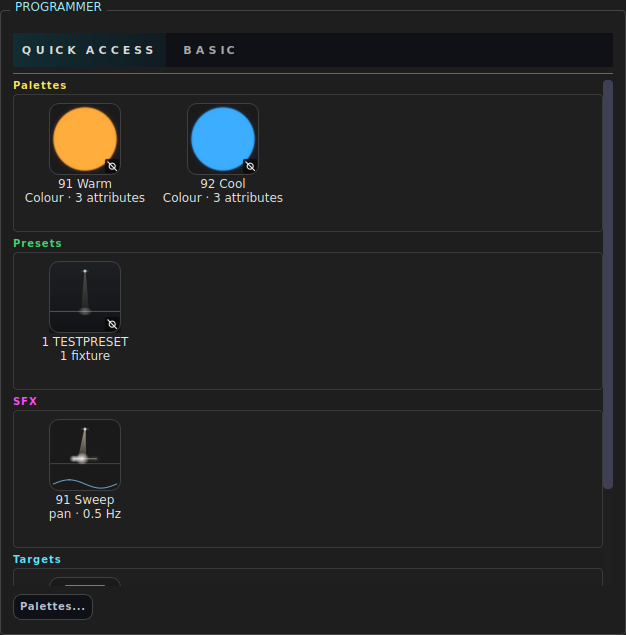
One row per kind, each with its own heading and its own sideways scroll:
Palettes · Presets · SFX · Targets
Roll the mouse wheel over a row and that row scrolls left and right. A row with nothing valid for the current selection is left out entirely rather than shown empty - absence says “not here”, where an empty box says “you have none”.
Each tile is the same generated picture as the icon views on the west-side Palettes / Presets / SFX / Targets tabs, so a palette reads identically in both places.
Clicking
| Gesture | What happens |
|---|---|
| Click | Turns that object on for the selection, and releases whatever else in that row was on |
| Ctrl-click or Shift-click | Stacks it on top of what is already applied in that row |
| Click an active tile | Turns it off |
| Right-click and drag | A fader: applies the object at a percentage, live as you drag, without touching anything else in the row |
The one-at-a-time rule is per row. Picking a second colour palette is normally a change of mind, not a second layer - but choosing a preset is not a decision about which palette you wanted, so the rows never disturb each other. Targets are one at a time whatever you hold.
Shift behaves exactly like Ctrl here: it never selects the run between two tiles.
The right-click fader writes one line to the command history - the value you released on - so a single Undo takes back the whole drag rather than walking you back through every intermediate value.
Tiles reflect the model, not the click
A tile lights up because the object is applied to the selection, not because the widget remembers being clicked. Apply a palette from the command line and its tile comes on; clear the programmer and every tile goes out.
What counts as “valid”
| Kind | Shown when |
|---|---|
| Palette (intensity) | the selection has an intensity-type capability |
| Palette (colour) | the selection has a colour-type capability - a palette stored in RGB is valid on a CMY fixture, because applying it converts the model |
| Palette (gobo / beam) | the palette’s fixture type is in the selection and that family’s capabilities are present |
| Preset | the preset stores values for a selected fixture, a selected group, a group holding a selected fixture, or a fixture in a selected group |
| SFX | at least one parameter the template drives exists in the selection |
| Target | the selection has a position-type capability |
Equivalent commands
Quick Access is a faster way to type things you already know:
PALETTE 3                 # click a palette tile
PALETTE 3 AMOUNT 50       # right-click fader to 50%
PRESET 2                  # click a preset tile
UNAPPLY PRESET 2          # click it again
APPLY SFX 1               # click an effect tile
UNAPPLY SFX 1
AIM AT TARGET 4           # click a target tile
See also
The programmer · Palettes · Presets · Effects (SFX) · Targets and aiming