Cues
Storing, editing, splitting and timing the states your show plays back.
Cues are stored show states that can include static values, timing data, targets and SFX references. They are the core playback object in LMX.
Cue structure
A cue may contain:
- Cue number and label
- One or more cue parts
- Per-part fade/release timing
- Fixture capability values
- Optional target/SFX information
In the GUI
Everything you can do with the cue commands below has a button in the Cues tab - you never have to type a command. The panel lists your cues on top and the cue controls run along the bottom:
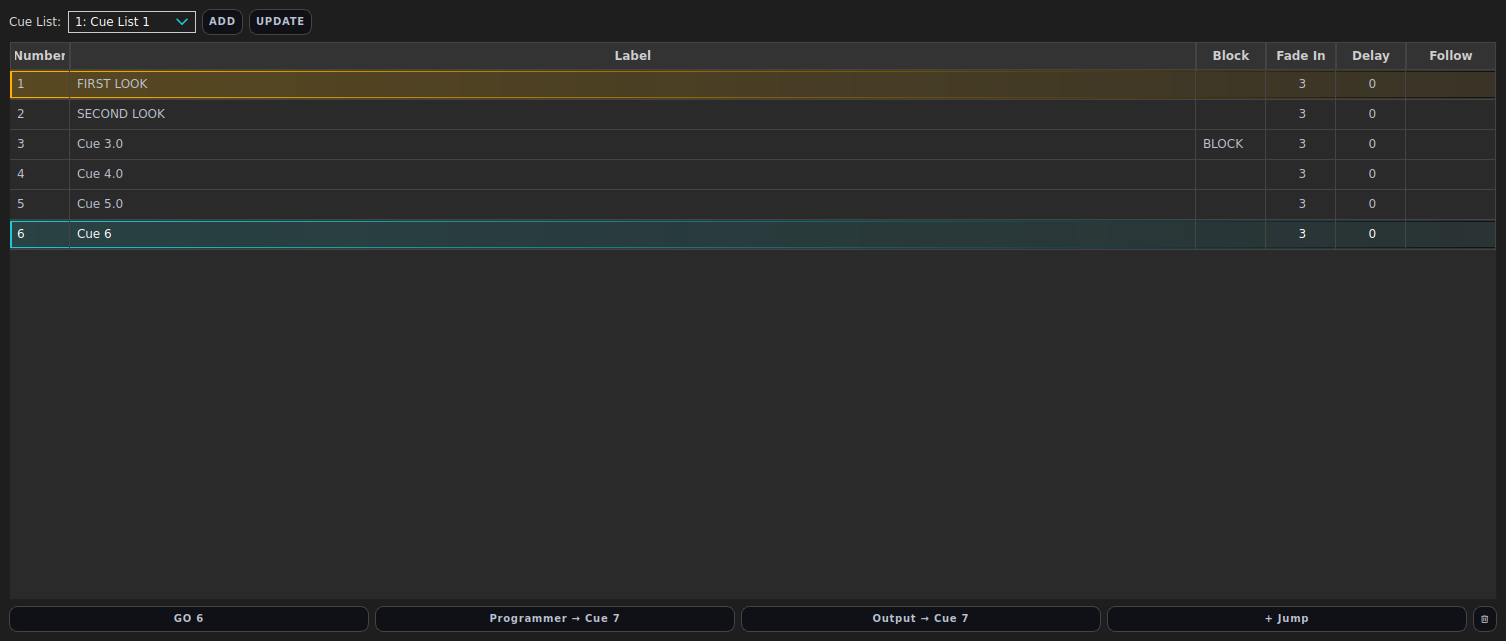
Each cue control has a command-line equivalent, so you can mix and match:
Store the programmer as a cue
Build a look in the programmer, then click Programmer →. It stores the current programmer contents into the next free cue number (shown on the button).

Equivalent command:
STORE CUE <n>- for exampleSTORE CUE 1 "Intro".
Fire the next cue
Click GO to advance playback to the next cue. The button shows which cue number it will fire next.

Equivalent command:
GO(orGO 7to jump straight to cue 7).
Other cue controls
| In the GUI | What it does | Equivalent command |
|---|---|---|
| Output → button | Store the whole live output (cues + faders + programmer) as one cue | STORE CUE <n> OUTPUT |
| + Jump button | Add a jump cue that redirects to another cue (loops/skips) | - |
| Trash button | Delete the selected cue | DELETE CUE <n> |
| Follow column (double-click the cell) | Cycle a cue’s auto-follow: Off → Follow → After Delay | CUE <n> FOLLOW ON|AFTERDELAY|OFF |
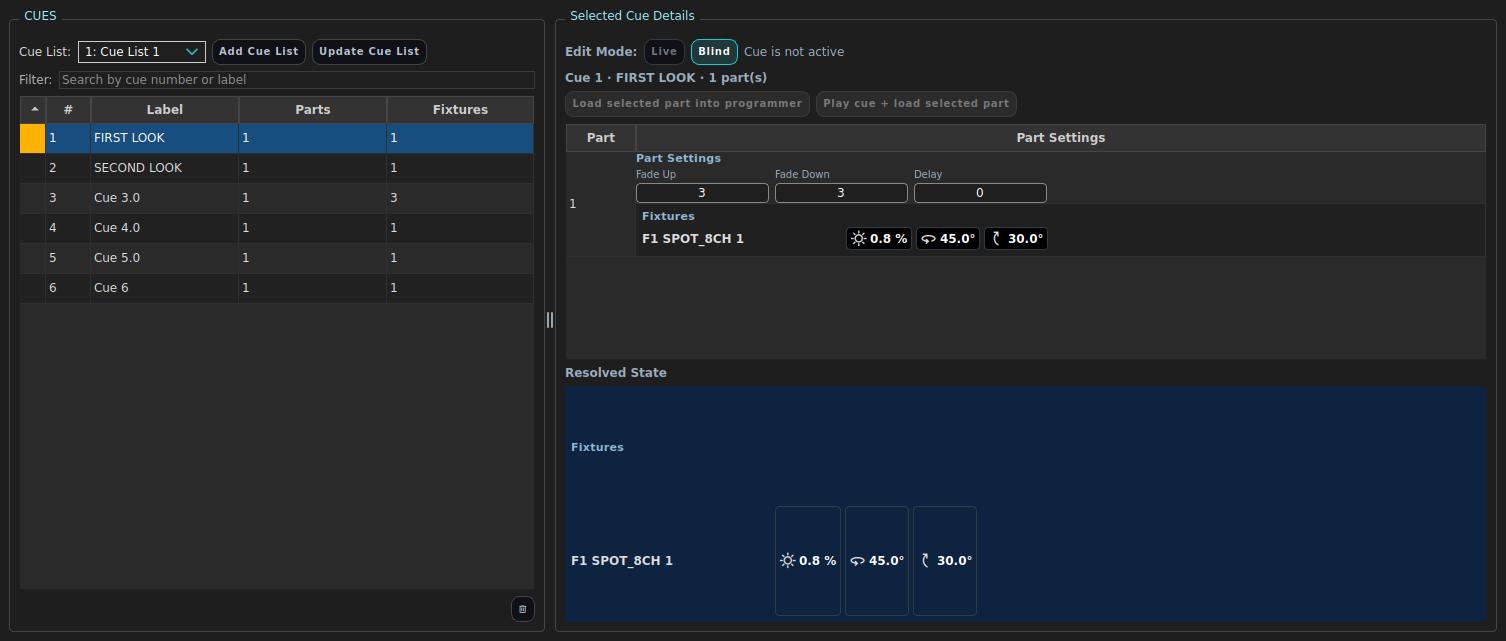
To review or edit a stored cue, select it and use the Cue Inspector tab.
CLI commands
LIST CUES                      # list all cues with fade times and flags
STORE CUE 1 "Intro"            # store the programmer as cue 1
UPDATE CUE 1                   # merge the programmer into cue 1
GO                             # advance to the next cue
GO 7                           # jump to cue 7
GO PREV                        # step back one cue
STOP                           # stop the selected cue list
Full store/update syntax:
STORE CUE <number|NEXT> ["label"] [PART <n>] [BLOCK|OUTPUT] [NOTRACK]
          [FADE <s>|FADEUP <s>|FADEDOWN <s>] [DELAY <s>]
UPDATE CUE <number> [PART <n>|ALLPARTS] [MERGE|REPLACE]
          [REMOVE FIXTURE <ids...>|REMOVE SELECTED]
          [FADE <s>|FADEUP <s>|FADEDOWN <s>|DELAY <s>]
          [PREMOVE ON|OFF] [LABEL "text"]
Additional useful commands:
LOAD CUE 12 INTO PROGRAMMER    # open cue 12's contents for editing
LOAD CUE 12 AT FADER 3         # put cue 12 on a fader
SHOW CUE 12 [FULL|RESOLVED]    # inspect stored / fully tracked state
DELETE CUE 12 [CUELIST <id>]
SPLIT CUE 12                   # split a cue into parts
Part delays
Every part carries its own DELAY, and all part delays are measured from
the moment the cue fires - parts never wait for earlier parts. A cue with
part 1 at delay 0, part 2 at delay 1 and part 3 at delay 2.5 starts its parts
at GO+0s, GO+1s and GO+2.5s regardless of how long each part’s fade runs.
CUE 12 PART 2 DELAY 1          # part 2 starts 1 s after the cue fires
CUE 12 PART 3 DELAY 2.5        # part 3 starts 2.5 s after the cue fires
Auto-follow
A cue can fire itself off the previous cue instead of waiting for GO. The trigger is stored on the cue that gets fired:
CUE 3 FOLLOW ON                # cue 3 fires the moment cue 2 fires
CUE 3 FOLLOW AFTERDELAY        # cue 3 fires once every part of cue 2 has
                               # finished fading in (max part delay + fade up)
CUE 3 FOLLOW OFF               # back to manual GO
Chained follows walk the list cue by cue, which is how you build unattended sequences and walk-in loops. Safety rules:
- A manual GO on the list while a follow is pending cancels the pending auto-fire - a cue you fire by hand is never fired a second time.
- STOP and KILL cancel any pending follow on that cue list.
The cue tables in the GUI show the trigger in the Follow column; double-click the cell to cycle Off → Follow → After Delay.
Programming examples
Basic sequence
STORE CUE 1 "Preset"
STORE CUE 2 "Walk in"
STORE CUE 3 "Band up"
GO
Update existing cue
GO 3
GROUP 2
RED 0 ; GREEN 0 ; BLUE 100
UPDATE CUE 3 LABEL "Band up (blue)"
Operator precautions
- Confirm you are updating the intended cue number.
- Label cues clearly for show-caller handover.
- Keep cue timings intentional; avoid accidental snap edits.
SFX in cues
STORE CUE records whatever SFX are running in the programmer, with their
targets and amount. On GO the desk diffs cue-to-cue: effects shared between
cues keep running with continuous phase, amount changes morph over the fade,
and effects that disappear fade out. See Effects (SFX) for details.
An effect applied to a group is stored as a group reference, so the cue
follows later membership changes (unless the show is in CONFIG GROUP ABSOLUTE). Removing a fixture or group from a cue -
UPDATE CUE <n> REMOVE FIXTURE <ids>, CUE <n> FIXTURE <ids> REMOVE,
CUE <n> GROUP <ids> REMOVE - also removes it from that cue’s SFX targets.
To add or remove an effect on a stored cue without going through the programmer:
CUE <number> [PART <n>] APPLY  SFX <ids...> [TO   [[FIXTURE] <ids...>] [GROUP <ids...>]] [AMOUNT <0-100>] [FREQUENCY <id>]
CUE <number> [PART <n>] REMOVE SFX <ids...> [FROM [[FIXTURE] <ids...>] [GROUP <ids...>]]
CUE <number> [PART <n>] UNAPPLY SFX <ids...> [FROM ...]   # same as REMOVE
APPLY aims at the current selection when there is no TO clause, and
replaces the template’s previous copy on the targets it names. Without FROM,
REMOVE drops the whole application; with FROM only those fixtures/groups
stop, and the application goes once nothing is left. APPLY writes to part 1
unless PART names another; REMOVE covers every part unless PART narrows
it. Examples:
CUE 12 APPLY SFX 2 TO GROUP 3 AMOUNT 60      # add it at 60%
CUE 12 REMOVE SFX 2                          # out of cue 12 entirely
CUE 12 REMOVE SFX 2 FROM FIXTURE 1 THRU 4    # just those four
CUE 12 REMOVE SFX 2 FROM GROUP 3             # drops the group reference
CUE 12 PART 2 UNAPPLY SFX 1 THRU 3           # a range, one part
XYZ targets have the same pair - CUE <n> [PART <p>] CAPTURE … AT TARGET <id>
and … RELEASE … FROM TARGET <id>, where naming no fixtures releases the cue’s
whole binding. See Targets and aiming.
The programmer round-trip still works and is the way to change a stored
effect rather than remove it. REPLACE is required - MERGE can only add or
update applications, never drop one:
LOAD CUE 12 INTO PROGRAMMER
SFX 2 OFF                     # or: FIXTURE 1 THRU 4 ; UNAPPLY SFX 2
UPDATE CUE 12 REPLACE
Recording the live stage: STORE CUE <n> OUTPUT
STORE CUE <n> OUTPUT snapshots the entire live merged output - active
cues, every raised fader, the programmer, and any running effect - and records
it into cue <n> as one self-contained absolute look. It is the “what you see
is what you get” store: build a look from faders and the programmer, then
freeze exactly that picture into a cue.
What it records:
- Absolute values, not references. Preset/palette references are flattened to the numbers they were producing at that instant.
- Only what is doing something. Attributes sitting at their default/home are dropped, so the cue stays small.
- Running effects are kept moving. Each live effect is re-recorded as an effect application on the static (DC) base it was riding, so on GO the cue replays the motion rather than a frozen frame.
Typical use:
FADER 1 100        # warm wash preset
FADER 5 60         # a pan effect riding it
1 + 2 RED 80       # a manual tweak on top
STORE CUE 20 "Look A" OUTPUT
What it handles
OUTPUT records the look by separating each running effect from the static base
beneath it. This is exact for:
- One or more effects riding a base - the normal case.
- Several effects stacked on the same attribute of one fixture - for example an absolute pan sweep with a relative pan wobble added on top, or the same effect applied by a cue, a fader and the programmer at once. Absolute effects overwrite and relative effects add (see Effects (SFX)); the recorder walks the live merge as a linear model, recovers the static base, and records each effect at the amount it actually contributed, so the replayed cue matches the live look.
- A static value overriding an effect from a higher layer - parking an
attribute over a running effect. If, live, a static value wins over an effect
on an attribute (e.g. a manual
REDover a colour chase, or a fader’s static pan over a cue’s pan effect), the recorded cue masks that effect on that attribute and records the static as the base, so the parked value survives on playback instead of the effect reclaiming the channel. The masking is per-attribute: a colour chase you’ve overridden on red keeps chasing green and blue. - A blend fader at partial level over an effect - scaling an effect down rather than parking it. A blend fader part-way up produces the effect at a reduced amplitude around a shifted centre; the recorded cue captures the effect at its effective per-attribute amount with a value-mode-aware base, so it reproduces the live look (relative and absolute effects alike).
Everything an operator can build by layering cues, faders and the programmer is
recorded faithfully by STORE CUE OUTPUT; these behaviours are pinned end-to-end
by tests/test_store_cue_output_fader_looks.py.
Global output stages are ignored
OUTPUT records the content look at unity. The global output stages - grand
and group masters, highlight / lowlight / solo, mute,
blackout, the calibration override and the life-safety emergency layer -
all run after the content is merged, so they are never baked into a recorded
cue. Record a look while the desk is in blackout, mastered down, or with a
fixture muted, and the cue still stores the full look as if everything were at
full and live. (This is why you can safely build and capture a state behind a
blackout.)