Generate from rig
Building groups, palettes, presets, effects and targets out of the patch.
Turns a patched rig into a starting show: groups, palettes, position presets, effects and targets, worked out from where the fixtures are and what they can do. It is the fastest way to get from “the rig is patched” to “something to program with”.
Open it with the Generate… button on the fixture action row, from
File → Generate from Rig…, or with GENERATE.
Generating only ever adds. Nothing you have made is overwritten or renumbered, so it is safe to run again after patching more fixtures.
The command
GENERATE                          # everything
GENERATE GROUPS                   # just one kind
GENERATE PALETTES PREVIEW         # say what it would do, change nothing
PREVIEW is worth running first: it lists what will be created, and - just as
usefully - what it decided not to create and why.
The window
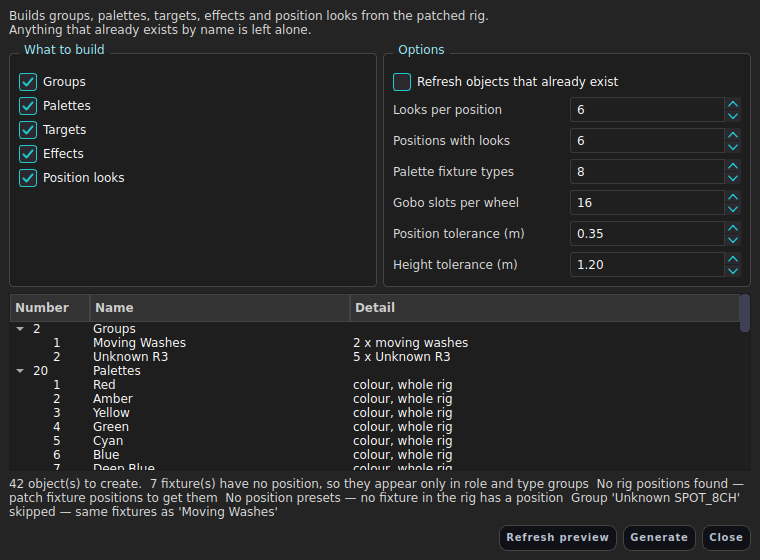
Every option that was deliberately kept off the command lives in the Generate
window as a visible control, so the command stays one memorable line. Tick the
kinds you want, adjust the counts, press Generate. Each control echoes its
CONFIG GENERATE … command.
What it builds
Groups
| Kind | Example |
|---|---|
| Rig-wide movers | All Movers |
| Role | Spots, Moving Washes, Pars, Bars, Strobes, Haze & Fog |
| Position | LX1, Side SR, Boom SL, or the truss’s own name |
| Fixture type | Chauvet Professional Rogue R3 Spot |
| Role within a position | LX3 Moving Washes |
| Subdivision | LX1 Odd, LX1 Even |
Two things worth knowing. A position always keeps its own group even when a
type group would hold exactly the same fixtures - LX2 is how you think about
that bar. Everything else collapses when the membership matches, so a rig of
nothing but R3 Spots does not get both Spots and the model name.
Odd/even alternates along the bar, not by fixture id, because ids may run the other way or skip.
Group membership is ordered along the position - house left to house right for bars, bottom to top for booms. That ordering is the point: a fan or an effect across a generated group sweeps the room instead of jumping about in patch order.
Palettes
Colour and intensity palettes are whole-rig: one RGB set covers everything, because applying a colour palette converts to CMY and snaps to a colour wheel per fixture as needed.
Beam and gobo palettes are scoped to a fixture type - one per zoom, focus, iris, frost and prism extreme, and one per gobo wheel slot. These multiply fast (ten mover types against a twelve-slot wheel is 120 palettes), so they are capped by fixture count, type count and slot count. The preview says what the caps dropped.
Targets
A 3×3 floor grid (Down Stage Left … Up Stage Right) plus Centre High,
spanning the rig’s own footprint rather than the stage box - a big declared
stage with a small rig in the middle of it would otherwise get targets nothing
can point at. With no fixture positions at all, it falls back to the stage box.
Effects
A template library gated on what the rig can actually do: Circle, Figure 8, Pan Sweep, Tilt Bounce and Ballyhoo if anything pans; Dimmer Chase, Sine and Pulse always; Colour Rainbow and Colour Bump if anything mixes colour; Zoom Pulse, Iris Pulse and Strobe Chase where those channels exist. Every effect carries a spread, which is what makes the position-ordered groups pay off.
Position looks
Twelve for the rig-wide mover set, and the strongest six for each bar and boom:
| Look | Pan | Tilt |
|---|---|---|
| Fan | linear | - |
| Fan In | V - ends wide, middle tight | - |
| Fan Out | Λ - middle wide, ends tight | - |
| Tilt Fan | - | linear |
| Wings 2 | two mirrored fans | - |
| Wings 3 | three wings | - |
| Wings In / Wings Out | wings folded in / out | - |
| Skew | winged | un-winged linear |
| Diagonal | linear | reversed |
| Twist | pinched in | spread out |
| Scatter | seeded random | seeded random |
Each look is stored the way a hand-programmed fan preset is: a group centre value plus a fan intent. It re-expands on recall, follows group membership, and stays editable - rather than freezing angles that go stale the moment a fixture is re-hung. See Fanning and spread.
Three decisions the rig makes for you:
- Fan width is a fraction of the narrowest member’s range, so a 540° head and a 180° one fan proportionally instead of one clamping flat.
- The centre aims the middle fixture at the centre of the rig.
- A set that cannot physically reach that point is skipped, with a note, rather than parked against its clamps.
Looks only go on groups made entirely of movers, and only on whole bars and booms.
Settings
All under CONFIG GENERATE, and all present in the Generate window:
CONFIG GENERATE REFRESH ON|OFF
CONFIG GENERATE LOOKS <count>
CONFIG GENERATE POSITIONS <count>
CONFIG GENERATE FROM GROUPS|PALETTES|PRESETS|SFX|TARGETS <number>
CONFIG GENERATE PALETTECAP TYPES|SLOTS|MINFIXTURES <count>
CONFIG GENERATE TOLERANCE <metres>
CONFIG GENERATE HEIGHT <metres>
FROM sets the id each kind starts numbering at, so generated objects can be
kept out of the range you use by hand.
TOLERANCE and HEIGHT decide how far apart two fixtures can sit and still count as being on the same bar. The vertical tolerance is deliberately looser than the horizontal one (1.2 m against 0.35 m by default): a hung fixture’s stored Z is the truss underside minus its own body height, so one bar carrying a batten and a large mover legitimately stores Z values half a metre apart. Judging height finely shatters the bar into pieces.
Limits
The generator is a pure function of the patch. It reads positions, roles and capabilities - it does not look at your live pan and tilt, and it will not invent a position for a fixture that has none. Fixtures with no position get role and type groups but no position groups and no position looks.
See also
Groups · Palettes · Presets · Effects (SFX) · Targets and aiming · Fixtures and patching